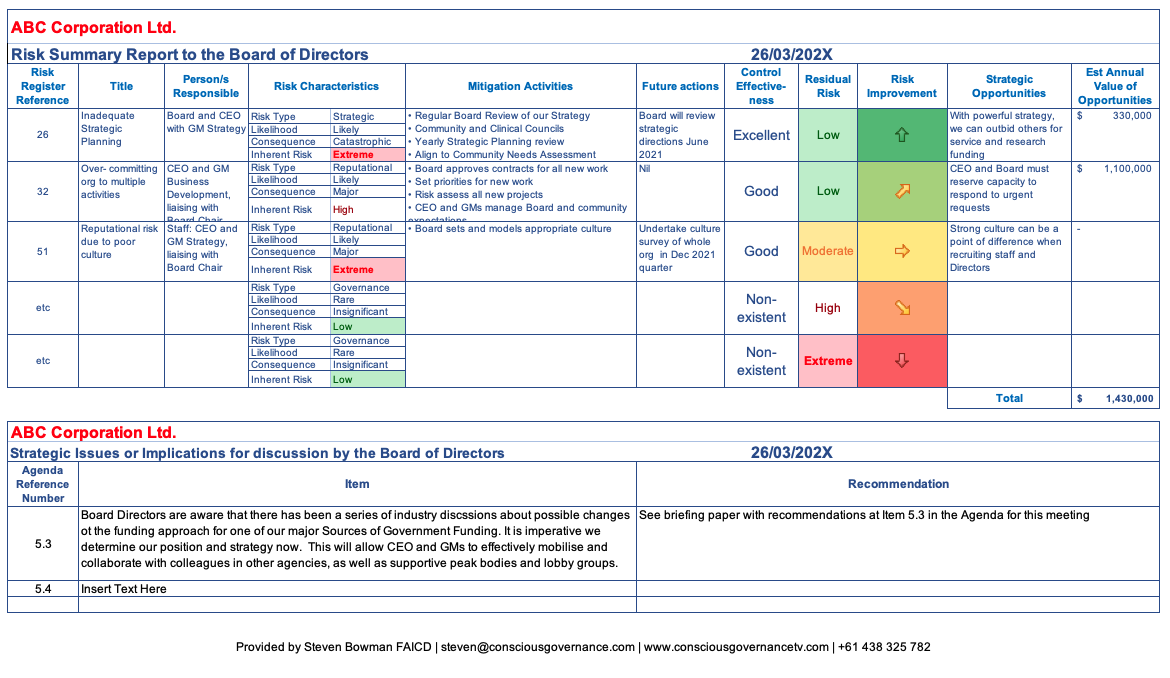
How to use a project risk register template
- Identify potential risks. Bring together your board and senior team to identify hazards and other project risks early in the project lifecycle - financial, operational, reputational, or compliance-related.
- Categorise each risk. Group risks by type so your board can see where exposure is concentrated.
- Score likelihood and impact. Rate each risk 1-5 on both scales, then multiply the two to get a risk score. This scoring process helps with risk assessment so you can assess and prioritise risks before they occur. This approach reflects widely used project risk management practice, as described in PMI's guidance on risk management.
- Assign an owner. Every risk needs a named person responsible for managing it, with clear responsibilities rather than a team or a job title.
- Document a mitigation strategy. Set out exactly what control measures will be used to reduce exposure and, where possible, eliminate the risk.
- Review and update regularly. A risk register is only useful if it reflects reality - regular reviews should form part of your wider processes, so revisit it at every board or committee meeting, retire risks that have passed, and add new ones as they emerge.
Risk register and risk assessment best practices
Risk register tips
- Update it regularly. A risk register that's reviewed only once a year quickly falls out of date.
- Share a weekly top 5 risk list. Give stakeholders a short update on the five risks needing the most attention that week.
- Assign clear ownership. Every risk should sit with a named person, not a department, and relevant stakeholders should be kept informed when details change.
- Keep descriptions concise. Write risks in plain language your whole board can understand at a glance.
- Review at every milestone. Build the risk register into your standing board or committee agenda rather than treating it as a once-off exercise.
- Connect risks to actions. An effective risk register needs a practical framework for follow-through, so once a mitigation strategy is agreed, track the resulting actions through to completion so nothing falls through the cracks.
For a board-level perspective on risk oversight, see the Governance Institute of Australia's guidance on risk management.
What our customers say
"We use BoardPro for all our meetings and not only is it easy for us, it's proven to be easy to navigate with our not so tech savvy members as well! It's organized, it looks amazing when auditors need to confirm our minutes, and it's just THAT useful. All around amazing!" Ericka P - Secretary, Small-Business (50 or fewer emp.)
"This is an excellent board tool. Mobility, no paper, ease of navigation, brilliant note options. The ability to quickly find previous papers and minutes is also very helpful for accountability." Paul M - Chairman, Mid-Market (51-1000 emp.)
"BoardPro has proven itself indispensable. The structured approach makes it easy to compile agendas and Board packs and then use this same structure for creating well-organised minutes. Being able to search for previous decisions and minutes, as well as easily keep tabs on actions is fantastic." Virginia C - Board Secretary, Mid-Market (51-1000 emp.)
FAQs
What is a risk register template and what should it include? A risk register template is a structured document for listing and tracking risks. A project risk register template should include a risk ID, description, category, likelihood, impact, risk score, mitigation strategy, owner, status, and when the risk was identified for each risk.
How do you score risk likelihood and impact? Rate both likelihood and impact on a 1-5 scale, then multiply the two figures together to get a risk score. Higher scores indicate risks that need attention first.
What are the common risk categories in a risk register? Most risk registers group risks into categories such as financial, operational, strategic, compliance, and reputational, though different industries may need categories for health or system-related risks as well.
How often should a risk register be updated? A risk register should be reviewed at every board or committee meeting, with new risks added and resolved risks closed off as circumstances change.
Who should own each risk in a risk register? Each risk should be assigned to a single named individual, not a team or job title, so accountability for managing and reporting on it is clear.
Is BoardPro's risk register template free to use? Yes. The Excel risk register template is a free download, with no sign-up commitment required.
Can I customise BoardPro's risk register template for my organisation? Yes. You can create a format that matches your processes, risk categories, scoring scale, and reporting cadence to prepare for reporting or audits.
Does BoardPro help manage risk beyond the template? Yes. BoardPro's Decision Register supports a broader framework for stakeholders by tracking the decisions and actions that come out of risk discussions, so mitigation strategies stay visible across the ongoing project lifecycle.
Get your free copy
Download the template now, or start a free trial to see how BoardPro brings your risk register, agendas, board packs, and minutes together in one governance-grade platform.